


For customers who have signed an account-opening contract, after registering for margin trading, FPTS will grant you a margin limit:
- VND 3 billion for customers who have signed a hard-copy account-opening contract
- VND 1 billion for customers who have signed an eKYC contract. If a customer later signs a hard-copy contract, the limit will also be reset to the default limit of VND 3 billion.
You can place a buy/sell order for margin securities in the following ways:
- Placing an order directly at the trading floor: Mark the Margin Trading column on the order form.
- Placing an order by telephone (applicable only to customers using a Token Card and registered for telephone trading). You must clearly state to the order-placing staff that you want to buy/sell margin securities.
- Placing an order online: You can perform this action on the EzTrade website or via the EzTrade mobile trading application
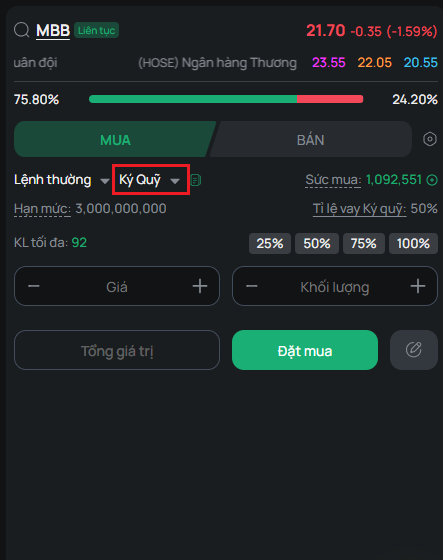
The steps for placing an order online are the same as for placing a regular buy/sell securities order, except you must select the Margin type
Note:
- The order-placing screen displays information such as Limit, Buying Power, and Margin Ratio, etc., for your reference
- For a securities symbol that is not eligible for margin lending, a notice will appear once you finish entering the “Securities Symbol” field
- For a margin sell order, the steps are similar to a Buy order; however, you must select the contract you want to sell from the list of margin contracts
- Automatic Quantity-Splitting feature: This lets you simply enter the volume, and the system will automatically select the contract(s) to sell in order of priority: (1) Margin securities, (2) Ordinary securities. The system only automatically selects board lots. To sell odd lots, you must select each contract individually
1. T+ Margin Service
The T+ Margin Service is designed for customers' short-term trading needs, offering a lower interest rate for a fixed period under the registered T+ package, to help optimize trading returns
Features of the T+ margin package:
- Number of T+ days: the number of days in the T+ package. For example, for a T+7 package, the contract term is 7 days from the date of the securities purchase. (Note: This is counted in calendar days, not business days).
- You receive a lower interest rate for n days on each loan corresponding to each T+n margin package.
- Separate in-term and overdue interest rate schedules for each package.
- If a loan is renewed, it will be subject to a higher overdue interest rate from the time of renewal.
- If you use a T+ margin package, you choose one of two automatic processing methods the system will apply at the end of trading day T+n if the margin contract has not been settled:
- Automatically renew the loan for a new three (03)-month term if the margin securities symbol is still on FPTS's list of marginable securities; any accrued loan interest (if any) will be added to the principal loan amount. After renewal, the contract will be subject to the overdue interest rate.
- Automatically sell off the entire remaining quantity of securities serving as collateral for the loan
- You can repay or renew the contract yourself, subject to the same regulations as a regular margin contract.
Note:
- You can easily register/change/cancel T+ margin packages online through FPTS's EzTrade trading applications, or you may submit these requests in person at an FPTS service counter. Changes made during the trading session take effect immediately and apply to all contracts for that trading day
- While using a T+ package, you may change the Package and Processing Method as needed
- If a contract is not automatically renewed successfully and has not been settled by its maturity date → the contract will be automatically sold off that same evening of day T+n
- All T+ margin contracts carry a minimum loan interest of VND 30,000. This minimum interest applies when the total loan interest on the contract (calculated as of the final recorded repayment transaction) is lower than this minimum amount
2. Registering for the T+ Margin Securities Purchase Package
You can register for the T+ margin securities purchase package in person at an FPTS Head Office/Branch/Transaction Office, or online via the EzTrade website or the EzTrade mobile trading application
To do this via the EzTrade website:
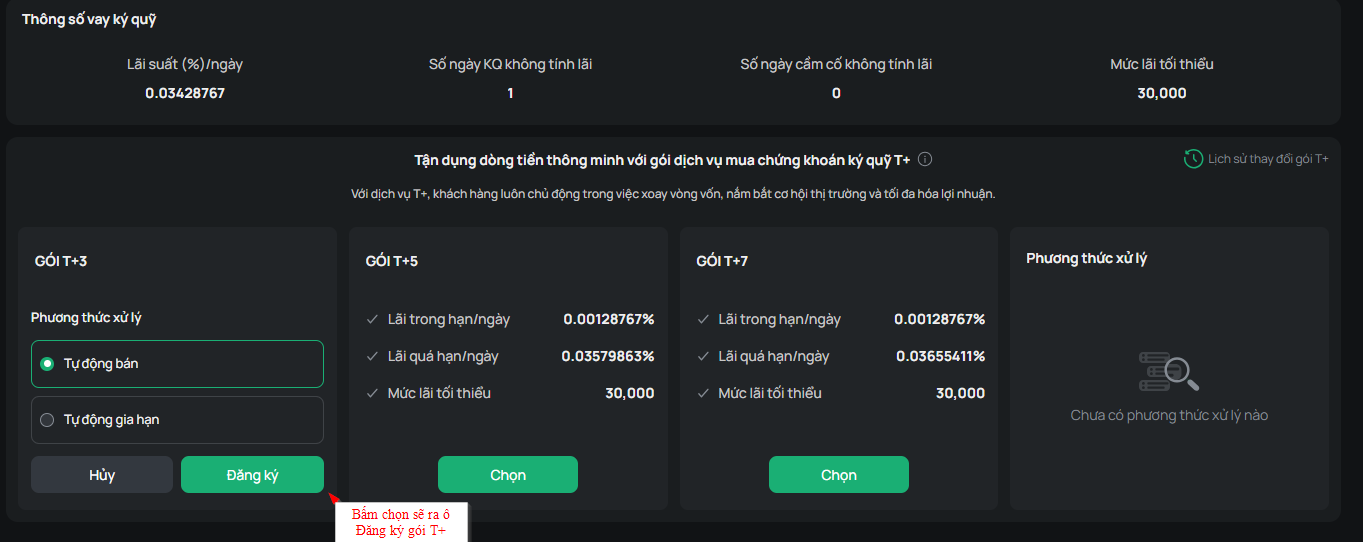
Step 1: Go to Function List, select Margin Loan Parameters, then click the “Select” button on the T+ package you want to use
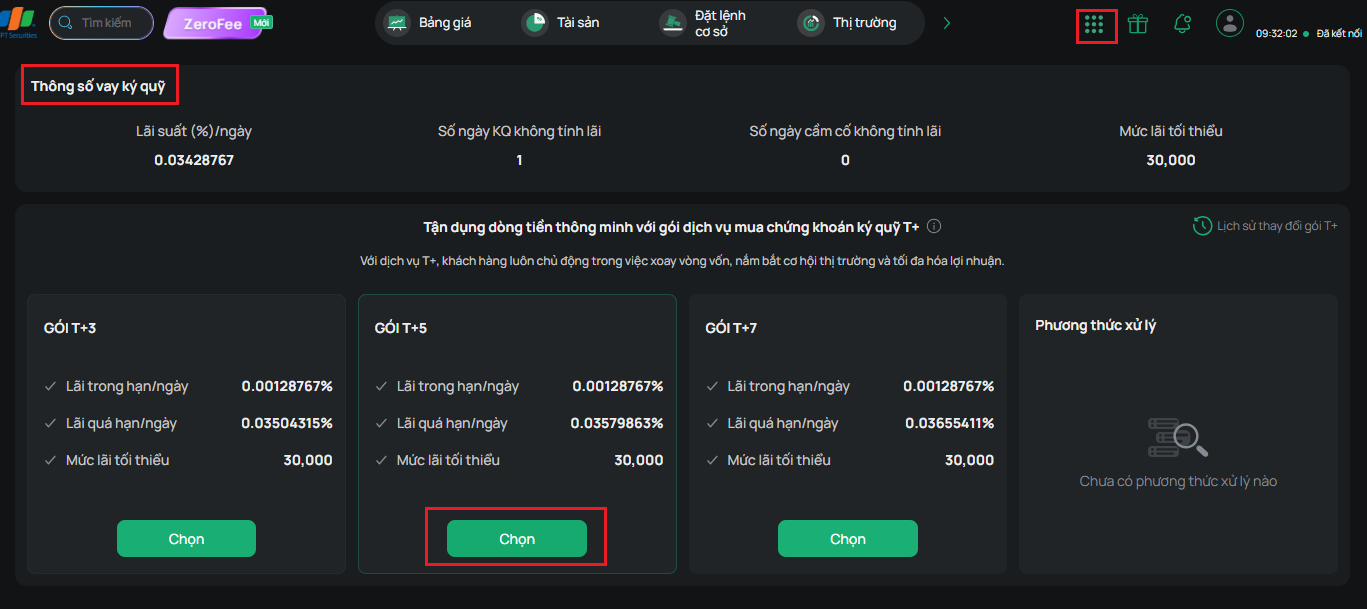
Step 2: Check the appropriate Processing Method, then click “Register”
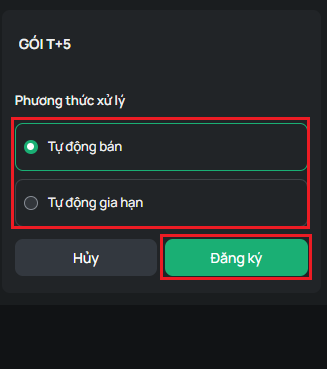
Step 3: Carefully read the Registration/Cancellation Request form, and check the box “I agree to the above terms.” Then click Continue, enter the OTP, and confirm.
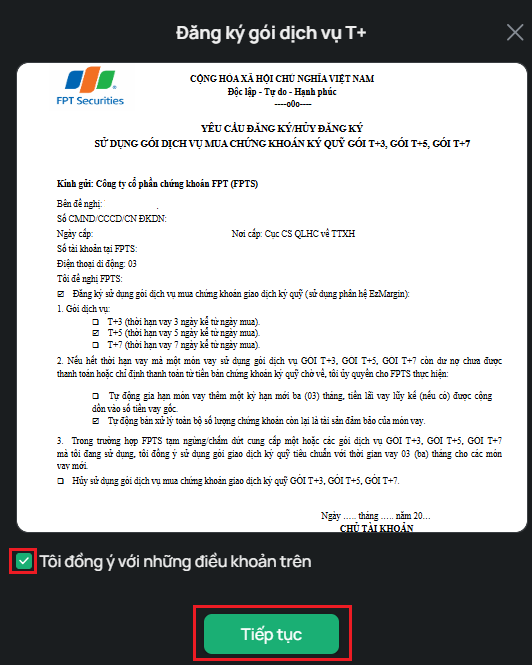
Note:
- If you register before 3:00 PM on the trading day: The T+ margin package takes effect immediately, and margin buy orders placed that day will have contracts created based on the T+ package information.
- If you register after 3:00 PM on the trading day: The T+ margin package takes effect the following day, and margin buy orders placed that day will still have contracts created based on the regular margin trading by item service.
- You can choose the Automatic Sell or Automatic Renewal processing method in case the margin contract has not been settled when the service is activated.
3. Changing the Package and Processing Method for an Overdue Loan
You can change your T+ package or the processing method for an overdue loan online via the EzTrade website or the EzTrade mobile trading application.
To do this via the EzTrade website: Go to Function List and select Margin Loan Parameters:
- To change the T+ margin package: Click the “Select” button on the T+ package you want to use; the T+ Package Registration information screen will appear. Read the information carefully and check the box “I agree to the above terms.” Then click Continue, enter the OTP, and confirm
- To change the Overdue Loan Processing Method: Check the Overdue Loan Processing Method you want to change to, click “Confirm,” enter the OTP, and confirm
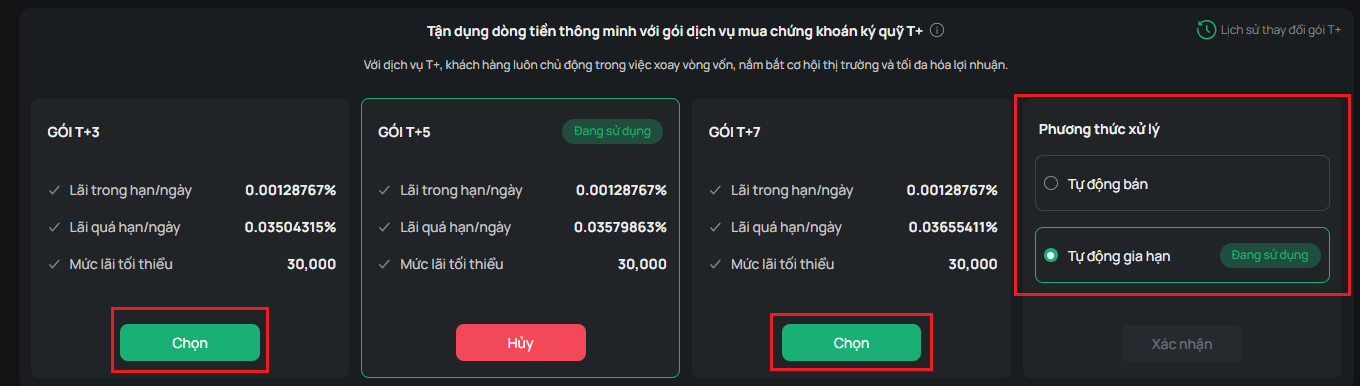
Note:
- You can change your T+ margin package multiple times during the day. However, the T+ package used as the basis for creating contracts for margin buy orders placed that day is the last T+ package you registered before 3:00 PM on the trading day.
- Similarly, you can change the loan processing method multiple times. At the end of trading day T+n (where n corresponds to 3/5/7 depending on the T+ package you use), if the margin contract has not been settled, the system will:
- Automatically sell off the entire remaining quantity of securities serving as collateral for the loan, if the package's processing method is Automatic Sell.
- Automatically renew the loan for a new three (03)-month term if the margin securities symbol is still on FPTS's list of marginable securities, adding any accrued loan interest to the principal loan amount, if the package's processing method is Automatic Renewal. After renewal, the contract will be subject to the overdue interest rate. Once renewed, the contract is treated as a regular margin contract, with repayment, renewal, and automatic sale handled the same way as a regular margin contract. For subsequent renewals of this contract, the renewal interest rate will be the regular margin interest rate.
4. Canceling the T+ Margin Securities Purchase Package
When you no longer need it, you can cancel the T+ margin securities purchase package in person at a trading counter, or online via the EzTrade website or the EzTrade application.
To do this via the EzTrade website:
Step 1: Go to Function List and select Margin Loan Parameters, then click the Cancel button on the T+ package you are currently using
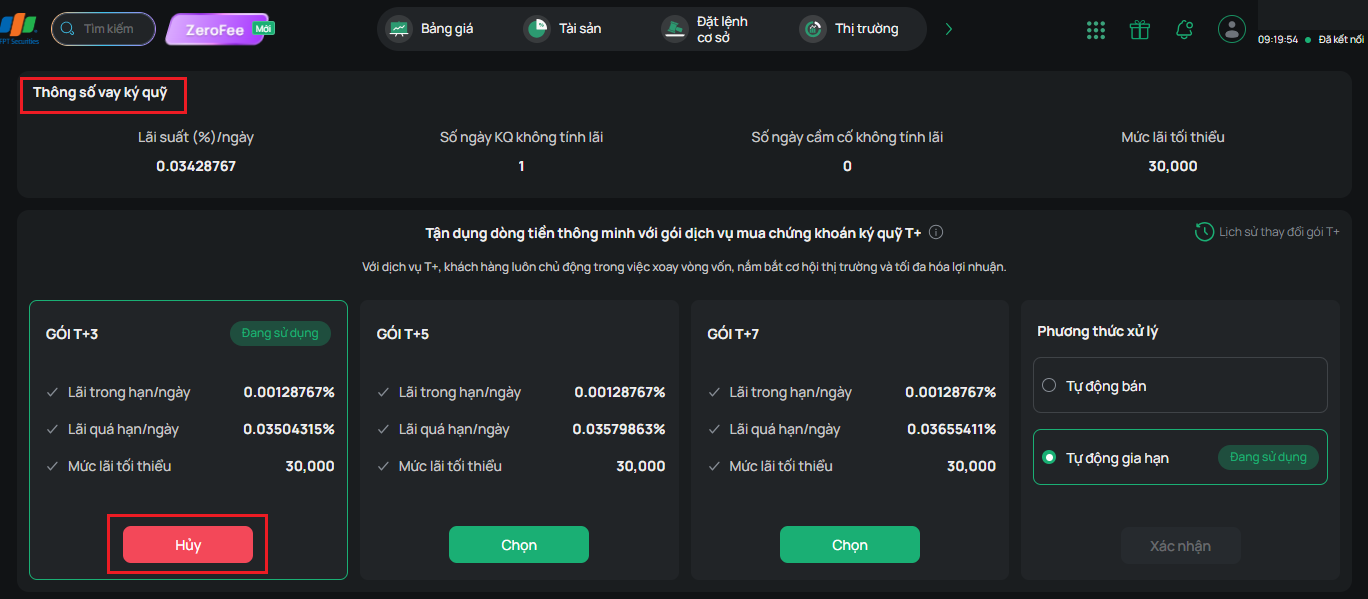
Step 2: Carefully read the Registration/Cancellation Request form, then check the box “I agree to the above terms.” Then click Continue, enter the OTP, and confirm.
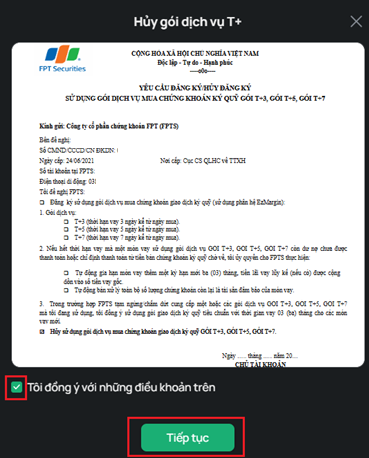
Once the cancellation of the T+ margin securities purchase package takes effect, you will use the margin trading by item service at the regular interest rate.
5. Buying on T+ Margin
Placing a T+ margin buy order is similar to a regular margin buy order. Unlike a regular margin purchase, a T+ margin buy order will create a T+ margin contract with the following parameters:
- Contract maturity date: calculated based on your account's currently active T+ package (for example, when creating a T+ Margin contract, if your account has an active T+7 package, the contract's maturity date will be calculated as 7 calendar days).
- If the maturity date (calculated in n calendar days) falls on a non-business day, the contract's maturity date will automatically move to the next business day.
- Interest rate: The in-term interest rate of the T+ margin package you have active on the trading date (with the in-term rate being more favorable than FPTS's standard interest rate)
A securities mortgage is when you use securities you already hold or are awaiting settlement as collateral to borrow money from FPTS. Similar to buying/selling securities on margin by item, you can pledge securities in the following ways:
- Placing an order directly at the trading floor: Use the Securities Pledge Request Form.
- Placing an order by telephone (applicable only to customers using a Token Card and registered for telephone trading). You must clearly state to the FPTS staff that you want to pledge securities.
- Placing an order via the Internet: You can perform this action on the EzTrade website or via the EzTrade mobile trading application
To do this via the EzTrade website:
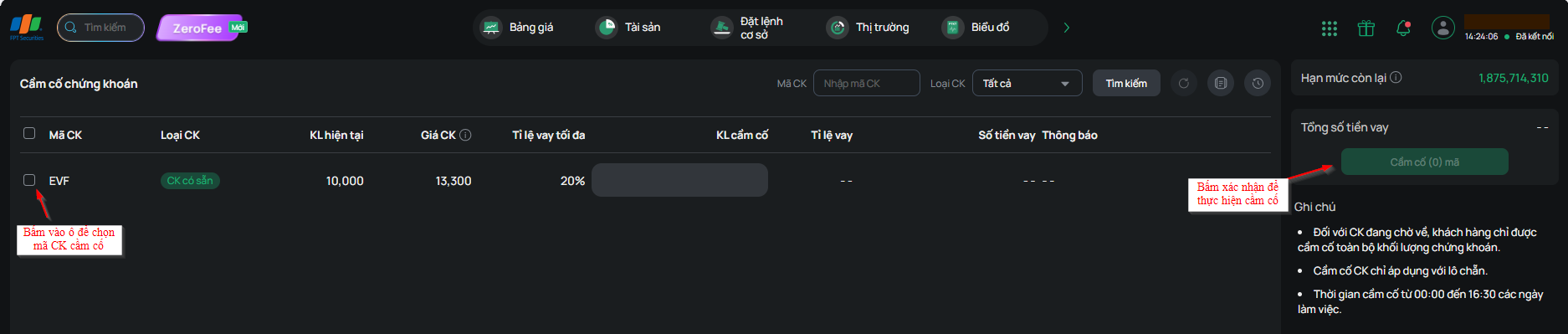
Step 1: Go to Function List and select Pledge Securities. The securities pledge request screen will appear for you to proceed.
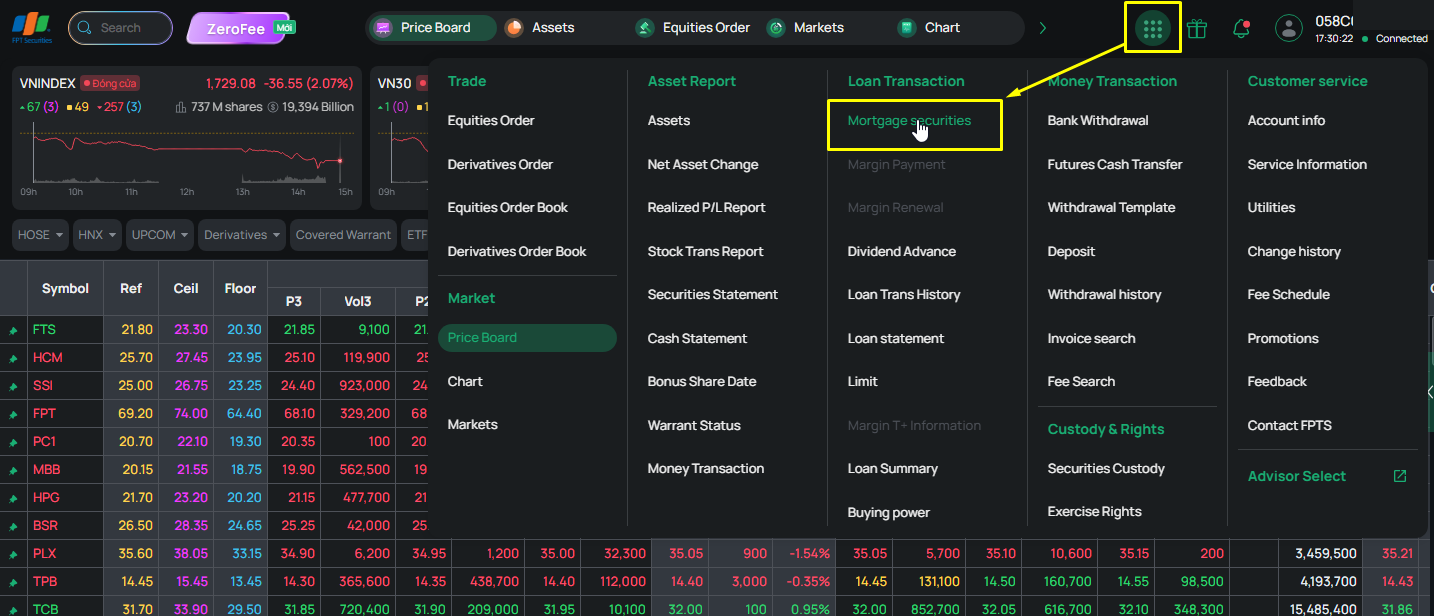
Step 2: Select the securities symbol(s) to pledge, then click “Pledge (quantity) symbol(s)” to enter the OTP and complete the pledge
Note:
- The list of securities on the pledge screen consists of all securities in your account that are eligible to be pledged
- For securities still settling into your account, you must pledge the entire quantity; you may only reduce the loan amount to suit your borrowing needs.
- The price used for the pledged securities is the closing price of the most recent trading session.
- The quantity of pledged securities must be in board lots as required by the Stock Exchange.
Once your margin-by-item contract has been successfully created (buying margin securities or pledging securities), you can make a repayment on that contract to reduce its outstanding balance.
There are 2 ways to repay a margin-by-item loan:
- Repaying a margin-by-item loan by selling margin securities: After the market closes for the day, the FPTS system will automatically calculate the principal and interest repayment corresponding to the securities sold. This amount will be held for FPTS to collect on the settlement date of that sell order. The remaining amount will be credited to your account on the settlement date (typically T+2).
- Repaying a margin-by-item loan in cash: You can repay a margin-by-item loan in cash in one of three ways:
- Placing an order directly at the trading floor: Use the Margin Loan Repayment Request Form
- Placing an order by telephone (applicable only to customers using a Token Card and registered for telephone trading). You must clearly state to the FPTS staff that you want to repay a margin-by-item loan.
- Placing an order via the Internet: You can perform this action on the EzTrade website or via the EzTrade mobile trading application
To do this via the EzTrade website:
Step 1: Go to Function List and select Repayment. The Repayment screen will appear for you to proceed.
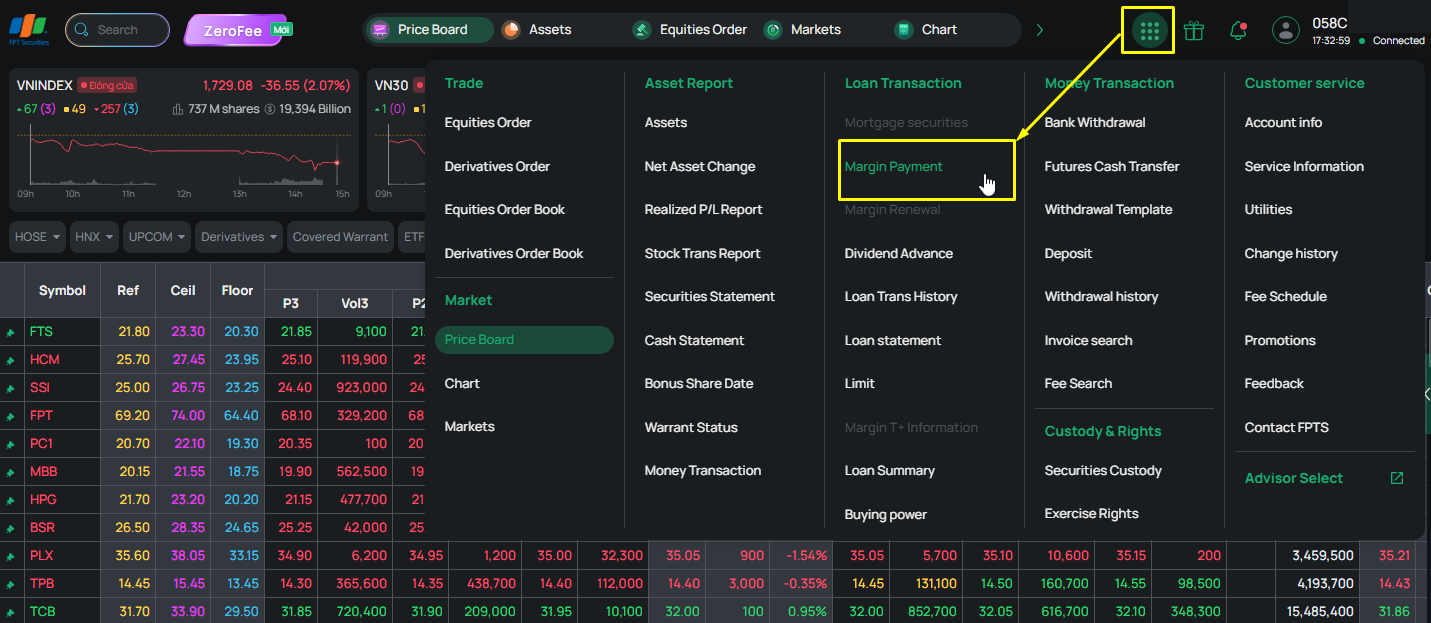
Step 2: You can select Calculation Assistance, check “Contract Number,” then click “Repay (quantity) Contracts” and verify the OTP to complete the repayment.
Note: The FPTS system can help calculate the principal repayment amount in certain special cases, such as: Repay to Clear the Processing Level, Repay to Clear the Warning Level, and Full Settlement.
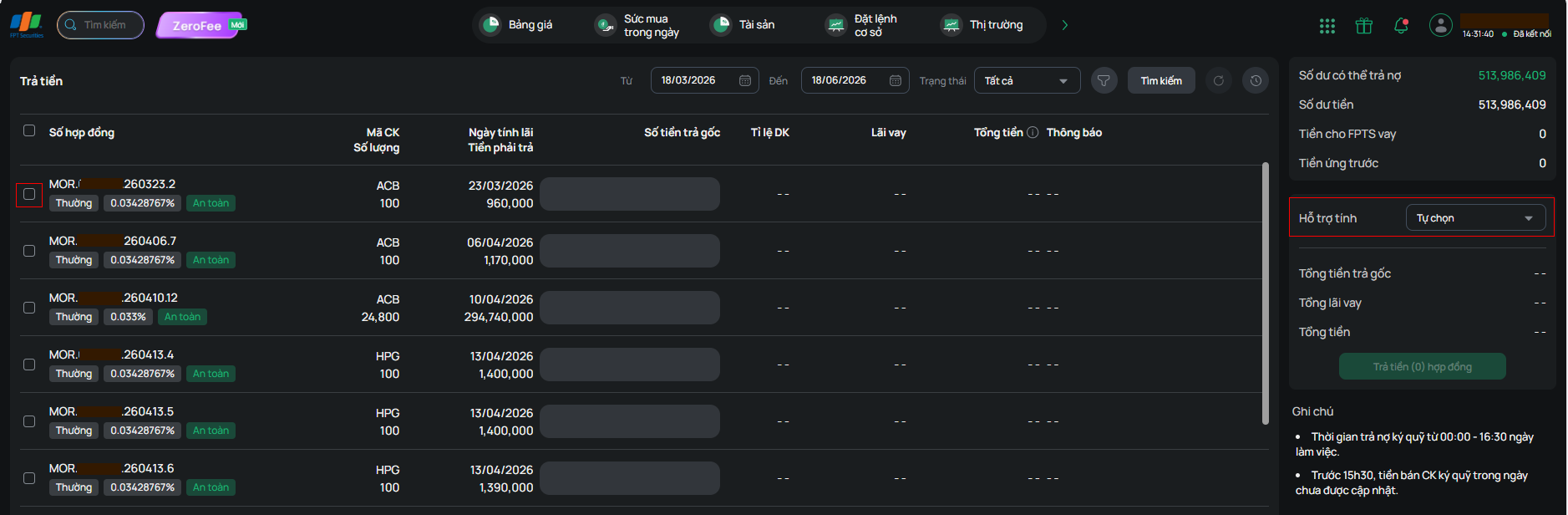
If you do not select Calculation Assistance, check “Contract Number,” enter the amount in the “Principal Repayment Amount” field, click Repay (quantity) Contracts, then verify the OTP to repay the contract
Note:
- Carefully check the Status of your orders after they are sent to the FPTS system: If the order is sent successfully, the system will display “Order successfully executed”; if the order fails, the system will display an error line in red in the corresponding “Message” field.
- During the trading session, if your margin-by-item contract has a pending sell order, that contract cannot be settled until the end of the trading session. If you want to settle the contract immediately, you must first cancel that sell order (if it has not yet been matched)
- For an order that has been matched (in whole or in part), you can make a repayment so that the outstanding balance is reduced to VND 1; the FPTS system will automatically settle the remaining balance after the trading session
- If you fully settle a margin-by-item contract where the securities purchased have not yet settled into your account by the end of day T+2, you can only pledge that quantity of shares again after T+2 (i.e., after the securities settle into your account)
- Times for repaying a margin-by-item loan in cash and renewing a margin-by-item contract:
- 0:00 AM – 4:30 PM on business days.
- 7:00 PM – midnight on business days.
- All weekends and public holidays (repayments made after 7:00 PM, or on public holidays or weekends, will be recorded on the next trading day).
Loan Term:
- The loan term is calculated separately for each loan as a three (03)-month period, including weekends and public holidays, from the date the margin transaction is executed (the date FPTS lends you the money). For T+ loan packages, the loan term corresponds to the term of the package you selected (for example, a T+3 package has a term of 3 days).
- When a loan expires, you may request a renewal: FPTS will consider extending the loan for another 3 months
- Starting 20 days before a contract's maturity date, you can request a renewal (Renewal Request).
Renewing a margin-by-item loan contract: This means you pay all of the loan interest on the contract, calculated from the date interest began accruing to the date of renewal, and the contract's maturity date is extended by 3 months from the renewal date.
You can renew a margin loan contract in the following ways:
- Placing an order directly at the trading floor: Use the Margin Contract Renewal Request Form.
- Placing an order by telephone (applicable only to customers using a Token Card and registered for telephone trading). You must clearly state to the FPTS staff that you want to renew a margin loan contract.
- Placing an order via the Internet: You can perform this action on the EzTrade website or via the EzTrade mobile trading application
To do this via the EzTrade website:
Step 1: Go to Function List and select Renewal. The Renewal screen will appear for you to proceed.
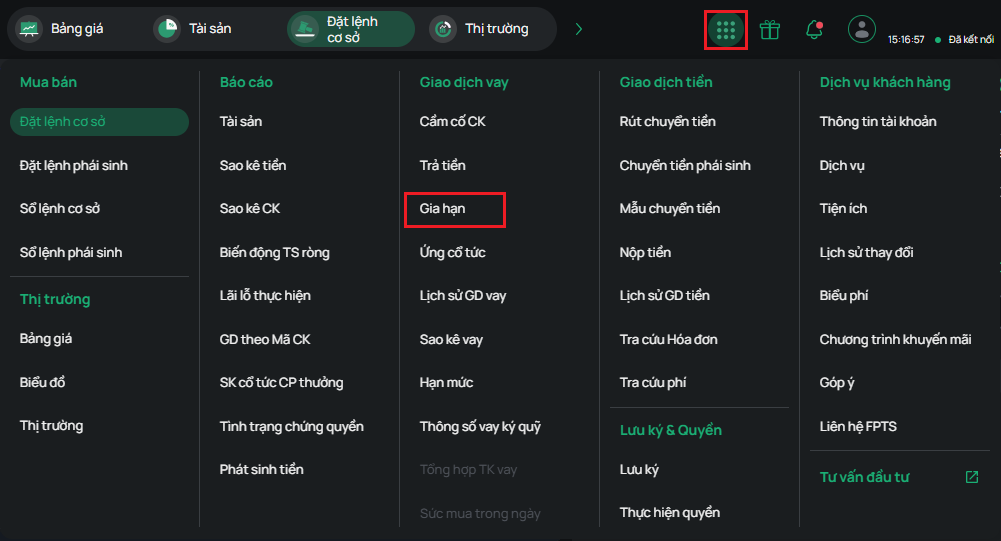
Step 2: The report displays contracts expiring and about to expire, one month before and after the search date; select the contract to renew by checking its contract number, then verify the OTP to renew the contract
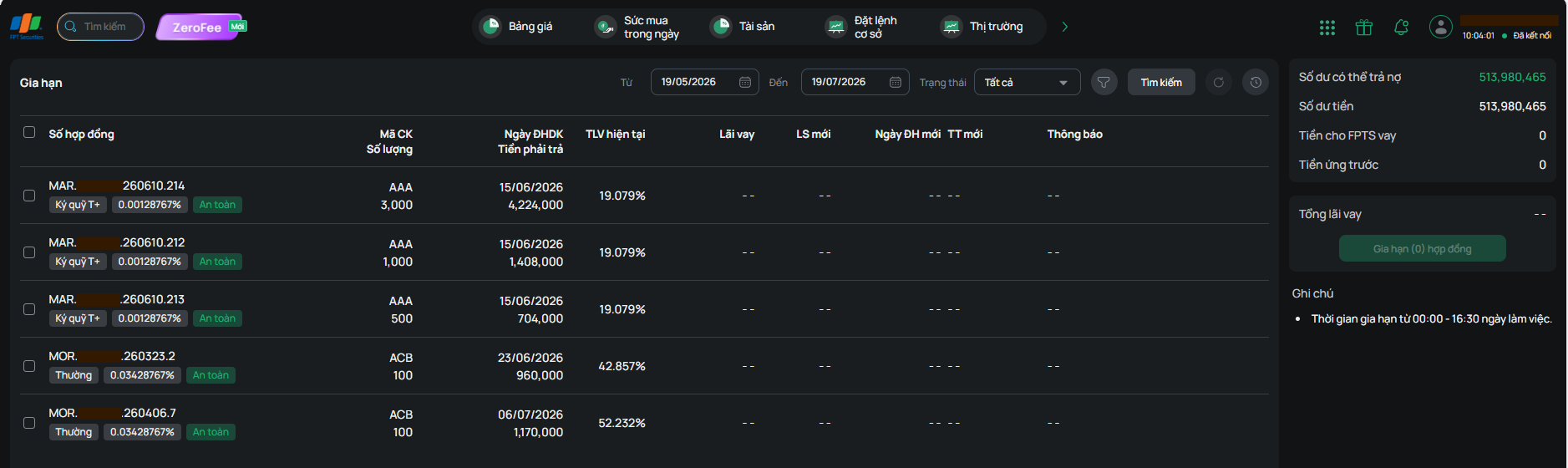
Note: If the order is sent successfully, the system will display “Order successfully executed”; if the order fails, the system will display an error line in red in the corresponding “Message” field.
If you have used nearly all of your limit and need more, you can submit a Limit Change Request online via the EzTrade website or the EzTrade mobile trading application
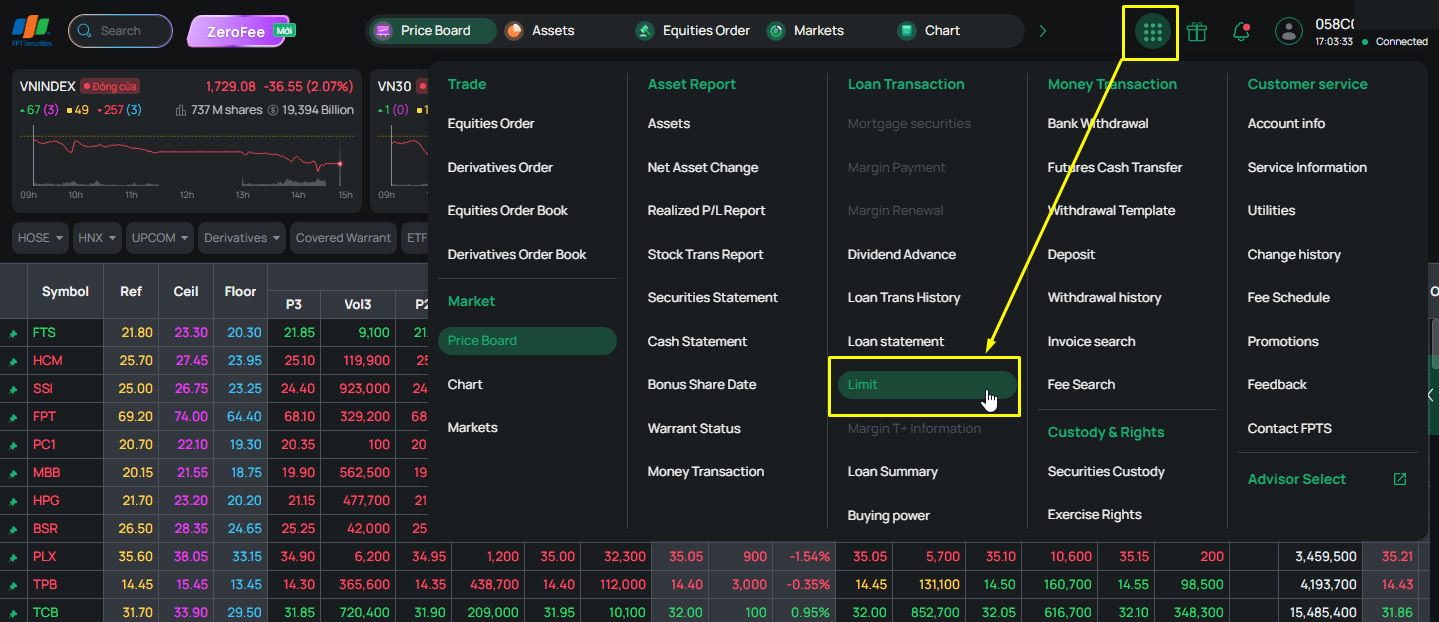
To do this via the EzTrade website:
Step 1: Go to Function List and select Limit. The Limit screen will appear, allowing you to request a limit change.
Step 2: Enter your desired limit in the Requested Limit field. Click Request, enter the OTP code, and click Confirm to send the request to FPTS. You can track the request's status and the actual limit approved by FPTS on this same screen
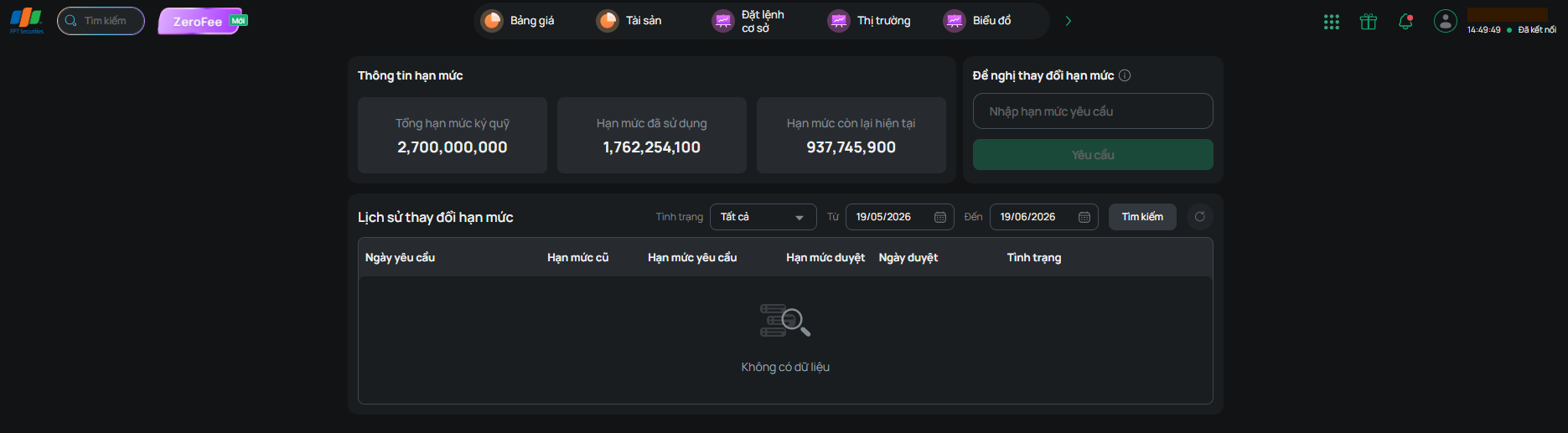
For a limit increase request:
- A request to increase the limit above VND 3 billion requires FPTS's assessment.
- A customer who signed an electronic contract and wants to request a limit above VND 1 billion must sign a hard-copy contract
Note: An online limit change request submitted between 7:00 PM the previous day and 8:00 AM the next trading session (outside business hours) for an amount greater than VND 3 billion will not be approved immediately.
The margin loan parameters lookup screen lets you view comprehensive information on your margin account and contracts. You can look up margin loan parameters on the EzTrade website or via the EzTrade mobile trading application
To do this via the EzTrade website:
Step 1: Go to Function List and select Margin Loan Parameters.
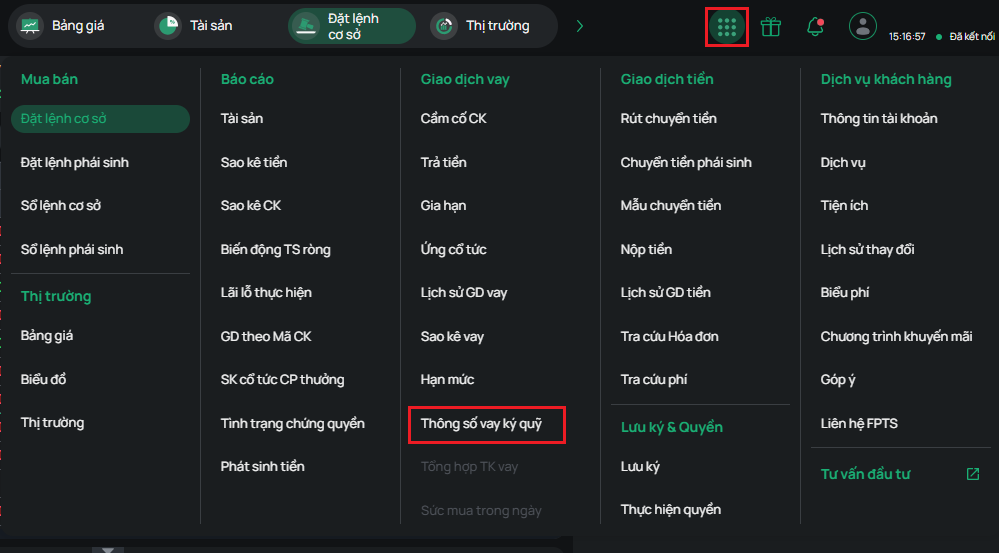
Step 2: The screen will display the following information for you to review:
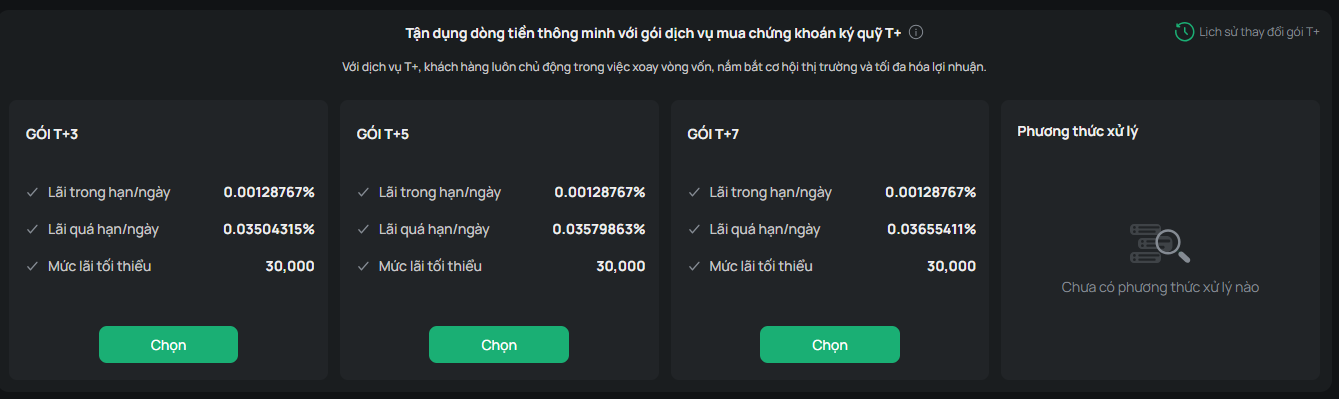
- Displays margin loan parameters and T+ package registration
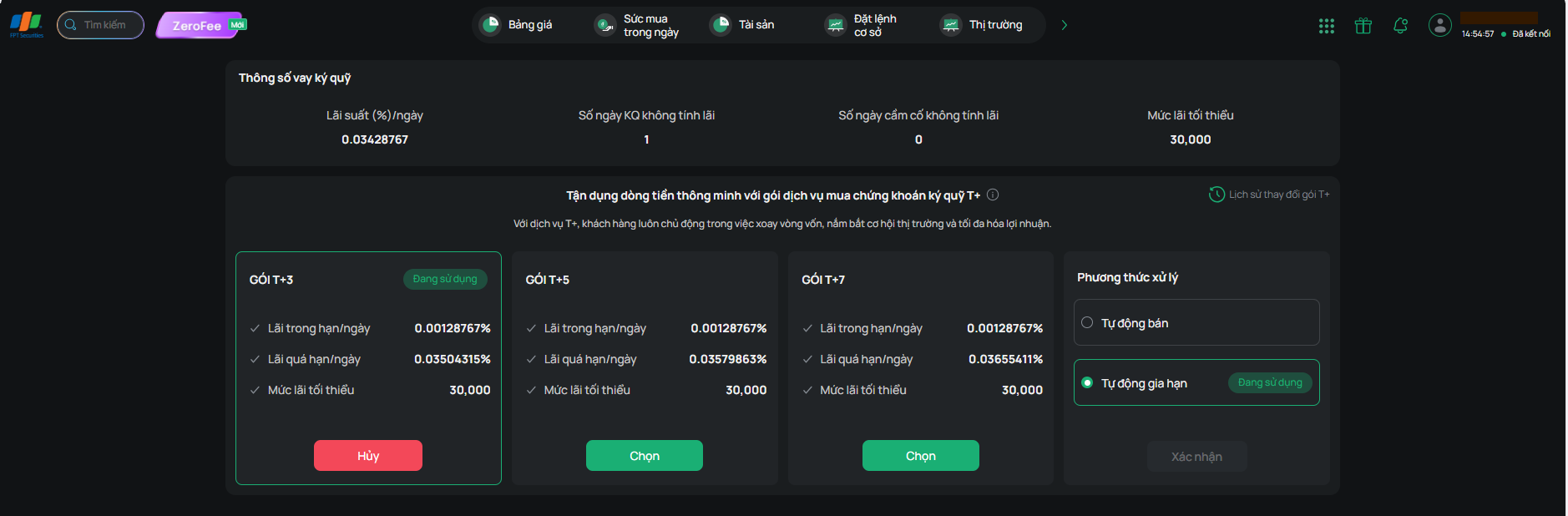
- Margin Loan Parameters: displays the interest rate for the regular loan package

- T+ Package Registration table: displays the interest rate corresponding to each package
- Click “Select” and “Processing Method” to register for a T+ package
Formula for calculating a margin contract's loan ratio:
Current loan ratio = Outstanding balance / Current contract value * 100(%)
The margin contract's status is based on its current loan ratio:
- If the contract's loan ratio < the warning level: The contract's status is Safe
- If the processing level (initial loan ratio + 15%) > the contract's loan ratio ≥ the warning level (initial loan ratio + 10%): The contract's status is Warning
- If the contract's loan ratio ≥ the processing level: The contract's status is Processing
When a contract falls into Processing status, the system automatically sends an email and SMS notification to you.
A margin call is sent to you when one of the following events occurs:
- The loan ratio of a loan increases by 15% (fifteen percent) above the initial loan ratio for any reason. In this case, the loan enters the Processing level;
- In certain special cases, including but not limited to: the margin securities being delisted, suspended from trading, or placed under special control; the company whose securities are on margin being consolidated, merged, or dissolved, etc.; or in the event of circumstances that seriously affect the price or liquidity of the margin securities such that FPTS may be unable to fully recover the principal and interest, FPTS will notify you and require you to repay the entire loan principal and interest on the same day or within 3 business days.
Deadline and payment method for a margin call:
- By 4:30 PM on the business day immediately following the day the loan enters Processing level, you are obligated to repay part of that loan to bring the loan ratio back below the Processing level.
- In special cases, you are obligated to repay the entire loan principal and interest as specified in FPTS's margin call.
Method of processing sale: If you fail to meet your obligation by the margin call deadline, or if a loan becomes overdue without the full principal and interest having been repaid, you are considered unable to make timely payment, and FPTS has full discretion to sell off the entire quantity of margin securities for that loan and collect the corresponding principal and interest from your securities trading account. FPTS decides the timing, order type, and selling price (at the floor price or via an ATO, ATC, or MTL order, etc.) of the processing sale order.