

Placing Negotiated Orders
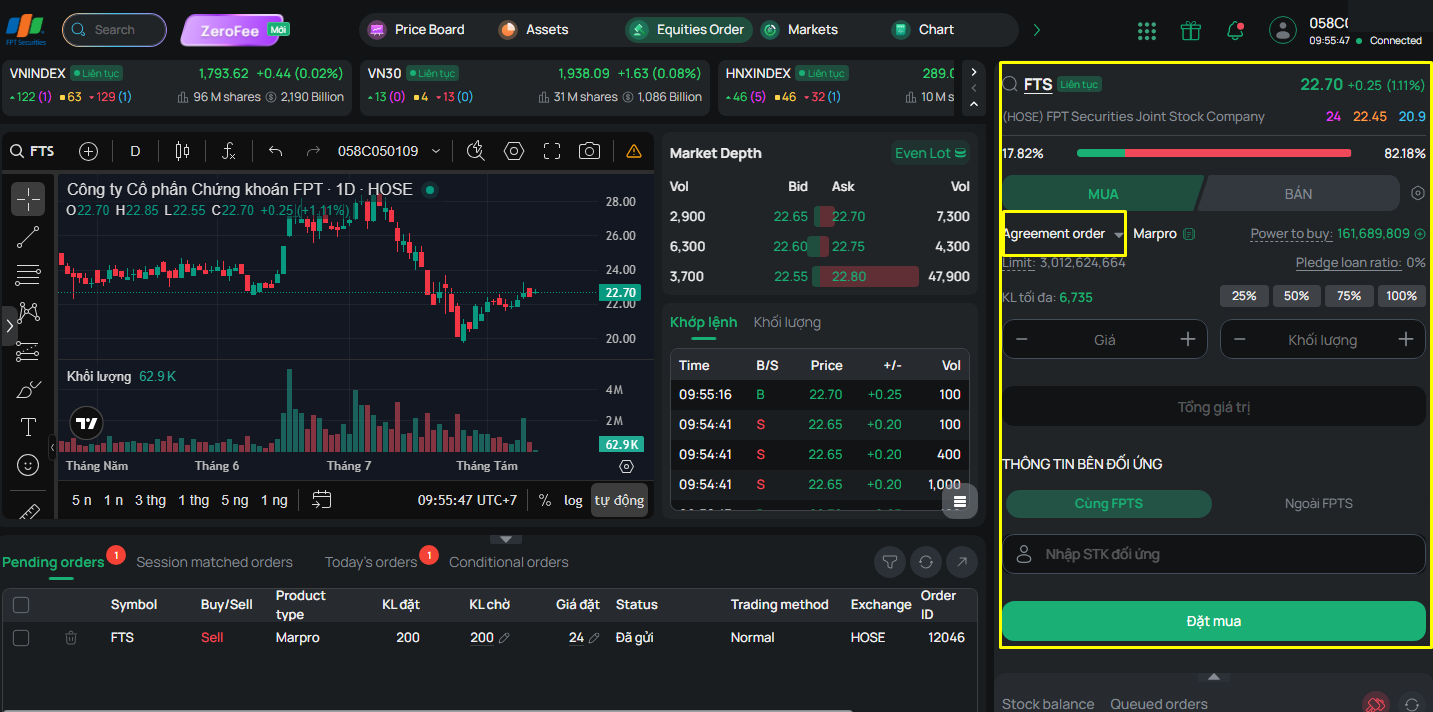
This feature allows you to place a negotiated order (Agreement Order) online; the order is sent to the FPTS system for FPTS to confirm and forward to the Exchange
You must enter the following information:
- Securities symbol
- Buy/Sell type
- Margin type: Cash/Margin/MarginPro
- Price
- Volume: Must comply with the volume regulations for negotiated trading applicable to each exchange.
Note: For a Sell order of the Margin type: the total volume must comply with the volume regulations, and each contract record must comply with a volume step of 1.
- Counterparty information:
+ If the counterparty is a customer within FPTS:
- Select Within FPTS
- Enter the counterparty's account number at FPTS; the screen will display the (abbreviated) counterparty account name
+ If the counterparty is a customer outside FPTS:
- Select Outside FPTS
- Enter the counterparty's company (a list is provided for you to select the counterparty securities company) and a contact phone number, so FPTS can conveniently communicate with the counterparty when entering the order
Once the order is successfully placed, FPTS will reconcile, confirm, and forward it to the Stock Exchange. When the order has been successfully submitted to the Stock Exchange, you will receive a notification.